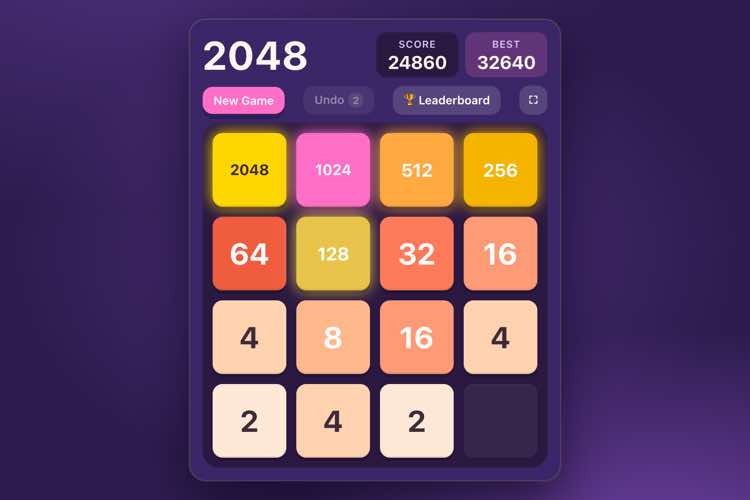
Welcome to our free browser edition of 2048, dressed in a warm cream and royal velvet purple arcade theme built for long, comfortable thinking sessions. Whether you want a crisp five-minute number-merge break or a patient climb toward 4096 and beyond, this responsive 4×4 board runs directly in your browser with zero downloads, zero pop-ups, 3× Undo charges per run, automatic local save, and a live cloud high-score leaderboard.
Press Play 2048 above to launch the board immediately—your keyboard focus is handed straight to the grid so you can start sliding tiles on your very first keystroke.
How to Play 2048
Every round begins with two small tiles (2 or 4) resting on an empty 4×4 grid. From there, the rules take less than a minute to learn:
- Slide all tiles together: Press one direction (Up, Down, Left, or Right) to shift every tile on the board as far as it can travel in that direction.
- Merge matching powers of 2: When two tiles showing the exact same number collide during a slide, they combine into a single tile worth their sum (
2 + 2 = 4,4 + 4 = 8,8 + 8 = 16, and so on). Each tile can only merge once per move, keeping chains predictable. - Plan around new spawns: After any move that changes the board, a fresh
2(most often) or4tile appears on a random open square. Keeping empty cells open prevents the board from locking up. - Reach 2048 and keep going: Merging two
1024tiles unlocks the golden 2048 tile and wins the classic challenge. Still have open lanes? Keep sliding to push toward4096and climb the global leaderboard.
Controls & Supported Devices
You can play smoothly on desktop keyboards, laptops, tablets, and phones using any of the inputs below:
| Input Method | Action | Best For |
|---|---|---|
Arrow Keys (↑ ↓ ← →) or WASD |
Slide all tiles in the chosen direction | Fast, accurate desktop play |
| Touch Swipe (Up / Down / Left / Right) | Drag across the 4×4 board to slide tiles | Phones, tablets, and touchscreens |
Toolbar Buttons (New Game, Undo ×3, Fullscreen, Leaderboard) |
Restart run, rewind last move, expand stage, view top scores | Recovery, focus mode, and score tracking |
4 Proven 2048 High-Score Strategies
Random swiping usually stalls around 256 or 512. Following four disciplined habits will consistently carry you past 2048:
1. Lock Your Highest Tile in One Corner
Pick one anchor corner—such as top-left or bottom-right—and keep your largest tile parked there for the entire run. Once a high tile drifts into the middle of the board, low-value spawns trap it on all sides and cut your board in half. Every move you choose should either keep that corner full or slide tiles toward it.
2. Build a Monotonic Snake Row
Arrange your anchor row in strictly descending order moving away from your corner (for example, 1024 → 512 → 256 → 128 across the top row), then snake the next row back in the opposite direction (16 ← 32 ← 64 ← 128). Because adjacent tiles along the snake sit one merge step apart, a single clean slide can trigger a satisfying chain reaction right up to your main tile.
3. Avoid Pressing the Opposite Direction
If your anchor corner is top-left, rely heavily on Up and Left, use Right cautiously only when your entire top row is packed with four tiles so the corner cannot slide away, and treat Down as a last resort. Whenever you are forced to swipe away from your anchor wall, make sure a new tile cannot spawn inside your corner before you slide back.
4. Save Your 3 Undos for Corner Disasters
Every game gives you three Undo charges (Undo ×3). Do not burn them to fix a minor 2 or 4 misplacement early on. Save your undos for late-game emergencies—such as a 4 spawning under your 1024 anchor tile after a forced move, or an accidental swipe that pulls your highest tile out of position.
Ready to switch gears after a high-score run? Head back to our flagship Loop Fence Puzzle for pure closed-loop Slitherlink deduction, review the fundamentals in How to Play Slitherlink, or sharpen your pattern recognition with our Slitherlink Strategy Guide.
Player Notes & Discussion (0)